
RFID Reader Interfaces: Wiegand, RS485, TCP/IP, USB, PoE
Published 25 Oct 20268 min read
Written and maintained by the RFID team at Identium Tech Solutions Pvt Ltd, New Delhi (India RFID Store).
Prices checked on 22 Oct 2026 against the catalogue.
Short answer: Choose the interface by what receives the tag numbers. Use Wiegand 26 or 34 when the reader feeds an access-control panel or a boom-barrier controller; RS-485 for long serial cable runs to a controller or PLC; Ethernet (TCP/IP) when software on a server or PC collects the reads, with PoE if one cable should carry both power and data; and USB, often in keyboard (HID) mode, for a reader at a desk PC. Phones connect over Bluetooth or USB-C. The matrix below shows which of our readers offers which.
Many RFID projects stall at the cable, not the tag: a reader that speaks Ethernet arrives at a site whose barrier controller only takes Wiegand, or a USB reader is specified for a gate far from the nearest PC. This guide explains each interface in plain terms for integrators, electricians and buyers, then maps our reader range by interface, using the figures on each product page. For the wiring of a door system and for keyboard mode, it links to the guides that already cover them in detail.
The catalogue interface matrix
Interfaces are listed as each product page states them. Read ranges depend on the tag, the mounting and the surroundings.
| Reader | Type | Interfaces | I/O and power | Read range | List price |
|---|---|---|---|---|---|
| IF9A | UHF integrated, 9 dBi antenna | USB, RS232, Wiegand, RJ45 Ethernet, PoE (class not stated on the product page) | Relay optional | Up to 25 m effective | ₹24,000 + GST |
| IF9A Wi-Fi, IF9A 4G and IF9A 2-port | UHF integrated versions | Wi-Fi with direct HTTP POST; built-in 4G pushing to a cloud server; the 2-port lists USB, RS232, Wiegand, RJ45, Wi-Fi, PoE and 4G as options (PoE class not stated on the product pages) | Relay optional | Up to 25 m effective | ₹30,000–₹45,000 + GST |
| IF9C | UHF integrated, 9 dBi antenna | TCP/IP (Ethernet), RS232, RS485, Wiegand 26/34 | 1 relay (COM/NO/NC); DC 9–24 V, up to 4 W | Up to 12 m | ₹16,000 + GST |
| IDTS-IHZ4 (and PoE version) | UHF fixed, 4 antenna ports | RJ45 (with PoE on the PoE version), RS-232, RS-485, Wiegand, USB 2.0 | 3 inputs, 3 relay outputs | Up to 30 m | ₹55,000 + GST |
| IDTS-IHZ4N (N704) | UHF fixed, 4 antenna ports | Ethernet 10/100 (TCP), RS-232, RS-485; Wiegand on request | 2 opto-isolated inputs, 2 relay outputs; DC 5–24 V | Up to 20 m (maker's test) | ₹30,000 + GST |
| ID-UCR-RD901M | UHF card reader for doors | Wiegand 26/34, RS485 | 12 V DC, 1 W or less | 0–1 m | ₹6,500 + GST |
| ID-IUR-3DBI | UHF wall reader, 3 dBi antenna | Wiegand 26/34 and RS485 | Wall mount, indoor | 1–3 m | ₹21,115 + GST |
| IDTS-RM26 | UHF reader module (board) | TCP/IP (Ethernet), RS232, RS485, Wiegand 26/34 | 1 relay; DC 9–24 V | Set by the antenna | price on request |
| IDTS-HRW560 | HF or LF network card reader | Wi-Fi, TCP/IP | External 9 V supply or PoE | 0–8 cm | ₹10,000 + GST |
| 103 | UHF desktop reader-writer | USB, serial or HID output (configurable) | No separate power supply; no driver | Up to 30 cm | ₹15,000 + GST |
| UDR-111 | UHF desktop reader-writer | USB; Active mode emulates an HID keyboard | USB powered | 0–50 cm | ₹10,500 + GST |
| UCR10 | UHF plug-in reader | USB Type-C into a phone or tablet | Powered by the host; no battery | Up to 1.5 m | ₹12,000 + GST |
| MUBR01 | UHF pocket reader | Bluetooth 4.0 BLE to Android | Built-in rechargeable battery | 0–3 m | ₹18,500 + GST |
| IDTS-LFPPR | 125 kHz desktop reader | USB, plug and play, no software or driver required | DC 5 V | 5–8 cm | ₹1,500 + GST |
Prices are catalogue list prices before GST. For the 125 kHz desktop reader, confirm keyboard output and the number format with your quote, as our scan-to-Excel guide explains.
Wiegand 26 and 34: what the wires carry
Wiegand is a common link between access-control readers and their panels. It uses three wires: DATA0, DATA1 and a common ground. Both data lines idle high, usually at +5 V; the reader sends a 0 by pulling DATA0 low and a 1 by pulling DATA1 low, one bit at a time. The original 26-bit format has one parity bit, an 8-bit facility code, a 16-bit ID and a trailing parity bit. That layout explains two everyday problems:
- Limited numbers. Eight bits allow facility codes 0–255 and sixteen bits allow card numbers 0–65,535, so a long tag or card number cannot pass through whole. Readers and panels therefore also use longer formats, such as the 34-bit option on our Wiegand readers, and many inconsistent extensions of the basic format exist. The reader and the panel must be set to the same format.
- Numbers that don't match the card print. What the panel shows is the facility code and ID from the bits it received, often in decimal, while the card may be printed in another form. Our guide to scanning RFID cards into Excel explains decimal versus hex.
Cable length matters too: most card reader manufacturers publish a maximum Wiegand cable run of 500 feet (150 m). For the connections between reader, controller, lock and exit button, read the section on controllers, Wiegand and wiring in our RFID access control set-up guide, and see the Wiegand glossary entry for a one-paragraph summary.
RS-485 and RS-232: serial links
RS-485 uses balanced (differential) signalling and supports several devices on one bus, at least 32 unit loads. It is generally accepted to work at data rates up to 10 Mbit/s or, at lower speeds, over distances up to 1,200 m, which is why it suits boom barriers, PLCs and long runs across a yard. Note what it is not: RS-485 defines only the electrical interface, not a communication protocol. The controller must speak the reader's command protocol, so ask for the protocol document or SDK before wiring a reader to a PLC.
RS-232 links one reader to one PC or controller over a short cable. It suits bench work, kiosks and older equipment; for a gate, prefer RS-485 or Ethernet.
Ethernet (TCP/IP), Wi-Fi and 4G
A network reader gets an IP address, and software on a PC or server either connects to it or receives the reads it pushes out. This is the usual choice for warehouses, dock doors and anything that feeds a WMS or ERP. Several of our readers push data without a PC on site: the IF9A Wi-Fi version posts tag reads over HTTP straight to your server, the IF9A 4G version pushes them to a cloud server over a SIM, and the HRW560 sends every card tap to your server over Wi-Fi or TCP/IP.
Utilities and SDKs for each reader are on the software downloads page, and our middleware guide explains how reads become ERP or WMS records.
PoE: one cable for power and data
Power over Ethernet carries DC power on the same cable as the data, so a reader on a pole or ceiling needs no separate adapter or socket. IEEE 802.3af (PoE) supplies up to 15.4 W per port, of which 12.95 W is guaranteed at the device; IEEE 802.3at (PoE+) supplies up to 30 W, with 25.5 W at the device. If your network switch has no PoE, a midspan injector sits between the switch and the reader and adds power without affecting the data.
Check the class before you buy the switch. The IF9A product page lists PoE without stating its class, so tell us your switch or injector when you ask for a quote; the IF9A evaluation kit page likewise asks you to say if you need a PoE injector with the kit. Readers whose product pages list a DC supply and no PoE, such as the IF9C (DC 9–24 V) and the IHZ4N (DC 5–24 V), need a separate supply at the read point. Mounting brackets, cables and PoE parts are in RFID accessories.
USB: serial, keyboard (HID) mode and USB-C
USB readers sit at a desk. In keyboard (HID) mode the reader behaves like a keyboard and types each tag number into whatever field has the cursor, so Excel, a web form or an ERP screen receives it with no software; in serial mode an application reads the port through the SDK. The 103 offers both, configurable; the UDR-111 emulates a keyboard in its Active mode. Our RFID scanner to Excel guide covers keyboard mode step by step, including duplicate scans and the Enter suffix, so it is not repeated here.
USB-C readers plug into a phone or tablet instead of a PC: the UCR10 runs on the host's power and works with Android 7.0 and later, and with USB-C iPhones on iOS 17 and later.
Bluetooth
Bluetooth readers pair with a phone that runs the app and supplies the screen. The MUBR01 connects over Bluetooth 4.0 BLE to Android 4.3 and later. Bluetooth is the right link when staff carry the reader, not when it is fixed to a wall; for a phone-based count, see can a phone read UHF RFID tags?
Relays and inputs
A relay output lets the reader switch something directly, such as opening a boom barrier, sounding a buzzer or lighting a lamp, without a controller in between. An input lets an external sensor tell the reader when to read. On our readers: the IF9C and the RM26 module each have one relay (COM/NO/NC); the IHZ4N has two opto-isolated inputs and two relay outputs rated DC 30 V / 1 A or AC 125 V / 0.75 A; the IHZ4 has three inputs and three relay outputs; and the IF9A offers an optional relay.
A checklist before you specify a reader
- What receives the data? An access-control panel or barrier controller usually means Wiegand; a PLC or long serial run, RS-485; a server or cloud, Ethernet, Wi-Fi or 4G; a desk PC, USB; a phone, Bluetooth or USB-C.
- How long is the cable? Most manufacturers publish about 150 m for Wiegand; RS-485 reaches up to 1,200 m at lower speeds; beyond that, use the network.
- How is the reader powered? Confirm the PoE class against your switch, or plan a DC supply at the read point.
- Which number format? Set Wiegand 26 or 34 to match the panel, and agree whether numbers are decimal or hex.
- Which software? Check for an SDK, a command protocol document or a ready utility. The IF9C and the RM26 module work with ID Tech and ZKRFID software.
To test an interface on the bench before a site install, the RM26 module evaluation kit brings out Ethernet, RS232, RS485, Wiegand 26/34 and a relay on one board, with a power adapter and antenna included; our 30-day pilot plan lists the data-path checks to run. If you are still choosing the type of reader, start with RFID machine or scanner: which reader you need.
Sources
- Wikipedia: Wiegand interface (DATA0/DATA1 and ground; the original 26-bit format; maximum cable run of 500 feet (150 m) published by most card reader manufacturers), accessed 25 October 2026
- Wikipedia: RS-485 (balanced, multipoint; at least 32 unit loads; up to 1,200 m at lower speeds; an electrical interface, not a protocol), accessed 25 October 2026
- Wikipedia: Power over Ethernet (IEEE 802.3af up to 15.4 W per port; 802.3at up to 30 W; midspan injectors), accessed 25 October 2026
Cite as: India RFID Store (Identium Tech Solutions Pvt Ltd), “RFID Reader Interfaces: Wiegand, RS485, TCP/IP, USB, PoE”, https://www.indiarfidstore.com/rfid-resources/rfid-reader-interfaces-wiegand-rs485-tcp-ip-usb-hid-poe-india, published 25 Oct 2026.
Frequently asked questions
What is the difference between Wiegand 26 and Wiegand 34?
How far can a Wiegand cable run?
Can I connect a UHF reader to my existing access-control panel?
Does the IF9A support PoE?
What is USB HID keyboard mode on an RFID reader?
Which reader can send reads to a server without a PC on site?
RFID ReaderWiegandRS485PoEIntegration
Keep reading
More guides


More in Readers & hardware
All guides: Readers & hardware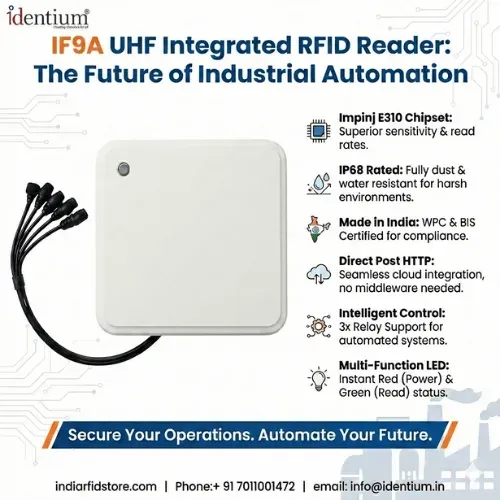
_Z7eD4S.webp)
_Z1zygRc.webp)