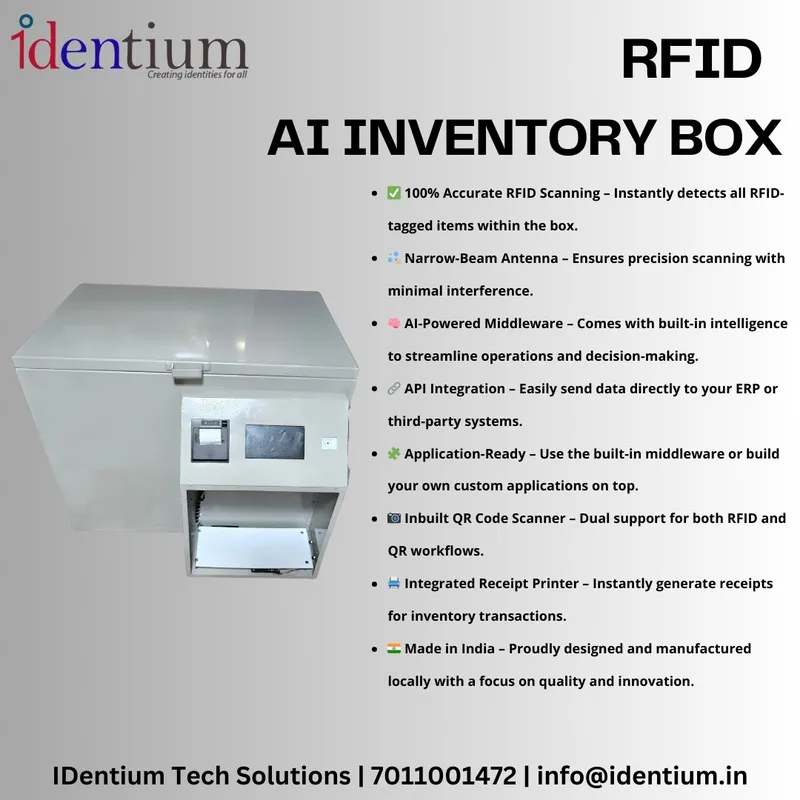
RFID AI Inventory Box AI-INV-BOX-01 with QR Scanner & Printer
A desktop RFID counting station: place tagged items inside and every tag is read automatically. A narrow-beam UHF antenna reads only what is in the box, and a QR scanner and receipt printer are built in for receiving, dispatch and audits.
₹2,75,000
per piece + 18% GST
₹3,24,500 incl. GST
Minimum order: 1 piece · buy online and pay by NEFT or UPI, or request a quote
View datasheet PDF · 221 KB- 7-day replacement · 1-year warranty against manufacturing defects
- Blue Dart next-day delivery
- Buy online, pay by NEFT or UPI · in-stock items are dispatched the same day after payment · shipping ₹300 per kg + GST
Key features
- Automatic scanning: items are read the moment they go into the box
- Narrow-beam UHF antenna reads only tags inside the enclosure
- AI middleware removes duplicate reads and validates SKUs
- Built-in QR code scanner for barcode-labelled stock
- Integrated thermal receipt printer for slips and audit records
- REST APIs push reads to SAP, Oracle, Tally, Zoho or a custom ERP; SDK supplied
Overview
What the RFID AI inventory box does
The AI-INV-BOX-01 is a counting station for RFID-tagged goods. An operator places a batch of tagged items in the box and every tag is identified automatically. There is no trigger to press and no handheld to sweep, so the count does not depend on how carefully someone scans.
The narrow-beam UHF antenna is tuned to the inside of the enclosure, so tags on shelves or counters next to the box are not picked up. That matters on a busy receiving desk where tagged stock is all around.
One station for RFID, QR codes and paperwork
- RFID count: AI middleware removes duplicate reads and validates SKUs before the count is recorded.
- QR scanning: the built-in scanner handles items or documents that carry a QR code instead of a tag, so mixed stock goes through one station.
- Printed record: the thermal printer issues transaction receipts and pick or put-away slips for the audit trail.
How it fits into a counting workflow
- Place. Put the tagged items, or the contents of a tray or carton, into the box.
- Count. Every tag inside is read, duplicates are dropped and SKUs are checked.
- Decide. Use the result for the receiving, dispatch, audit or cycle-count step at hand.
- Record. Print a slip and send the data to your ERP.
ERP and software integration
Read data can be pushed live to SAP, Oracle, Tally, Zoho or a custom ERP through documented REST APIs. Use the on-board middleware as supplied, or build your own application on the SDK. Our RFID software and middleware guide explains how tag reads turn into ERP records.
What you need alongside
Every item to be counted needs a UHF RFID tag or label. If you are tagging stock for the first time, browse UHF RFID tags or, for showrooms, RFID jewellery tags. The box is designed and manufactured in India.
Typical applications
- Retail stockroom audits
- Warehouse receiving checks
- Dispatch verification
- Jewellery stock counts
- Tool-crib check-in/out
- Pharma and FMCG inventory
- Garment inventory
- Library and documents
Product video
Specifications
Datasheet (PDF)| Technology | UHF RFID |
|---|---|
| Antenna | Narrow-beam UHF antenna, reads inside the enclosure only |
| Scanning | Automatic on placement, no trigger |
| Barcode | Built-in QR code scanner |
| Printer | Integrated thermal receipt printer |
| Software | On-board AI middleware: duplicate removal, SKU validation |
| Integration | Documented REST APIs; SDK for custom applications |
| Form factor | Compact desktop unit |

_2jEWwo.webp)
_Z7eD4S.webp)
_Z1zygRc.webp)