
RFID Gate, Portal & Tunnel Readers: The 2026 India Buying Guide for Dock Doors & Choke Points
Published 18 Jul 2026Updated 4 Oct 20266 min read
If you are automating a dock door, a conveyor line or a warehouse choke point with RFID, the reader you pick at the entry point decides whether the whole system works. This guide is for Indian operations managers, systems integrators and warehouse teams in retail, manufacturing, logistics and 3PL who are specifying UHF RFID gate, portal or tunnel readers. It covers antenna placement, read zones, IP rating and stray-read control, so you get them right the first time.
RFID gate, portal or tunnel reader: what each one does
All three read tags on the move, but they suit different geometries. Choosing the wrong one is a common and expensive mistake on Indian sites.
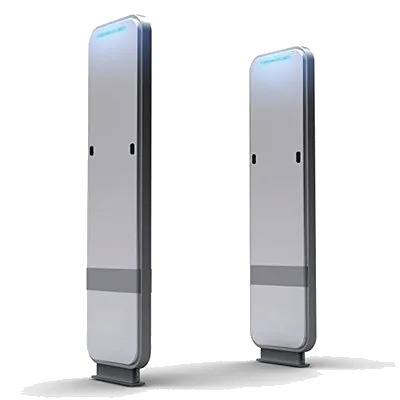
Gate / portal readers
Vertical antennas mounted on both sides of a dock door, shutter or aisle, so tagged pallets, cartons or trolleys are read as they pass through. Best for goods-in and goods-out, dispatch bays and store entrances.
Tunnel readers
An enclosed, shielded box over a conveyor belt that reads each carton individually at speed. Best for e-commerce fulfilment, courier hubs and carton-level verification where every read must count.
Single-antenna choke points
A narrow doorway or single lane where one or two antennas are enough. Common for tool cribs, asset rooms and small manufacturing WIP gates.
Integrated readers vs fixed readers with external antennas
This is the first hardware decision. An integrated reader combines the RF module and antenna in one weatherproof housing, while a fixed 4-port UHF reader connects to separate external RFID antennas by coaxial cable. Both have their place.
| Factor | Integrated reader (reader + antenna) | Fixed reader + external antennas |
|---|---|---|
| Best for | Single doorways, small gates, quick deployment | Wide dock doors, tunnels, multi-lane portals |
| Antennas covered | 1 built-in (some add 1 auxiliary port) | Up to 4 (or 8/16 with hubs) |
| Read-zone tuning | Limited; fixed to the housing angle | Fully adjustable per antenna |
| Install effort | Low: one unit, one PoE/data cable | Higher: cabling, mounting, tuning |
| Cost profile | One unit; least cabling and tuning | Reader plus 2–4 antennas, cabling and on-site tuning |
Rule of thumb: for a doorway under about 1.2 m wide, an integrated reader is faster and cheaper to commission. For a standard 2.5–3 m dock door or a conveyor tunnel, a 4-port fixed reader with 2–4 antennas gives you the coverage and tuning control you need.
Antenna placement and read zones
The read zone is the invisible RF bubble where tags reliably respond. Shaping that bubble to match your doorway, and nothing beyond it, is most of the work in a successful install.
Portal geometry that works
- Two-sided portals: mount circularly polarised antennas on both jambs, angled 15–30° inward and slightly toward the direction of travel, so tags in any orientation are illuminated.
- Height staggering: place antennas at different heights (for example 0.9 m and 1.8 m) to cover both low pallets and tall stacks on a trolley.
- Circular vs linear polarisation: use circular for mixed or random tag orientation (typical in retail and logistics); use linear only when tag orientation is fixed and you want longer range down a tunnel.
- Trigger the read, don't read constantly: pair the reader with photoelectric or motion sensors (GPIO-triggered) so it only reads when something is actually in the doorway. This cuts stray reads and improves accuracy.
Tunnel geometry
Conveyor tunnels use RF-absorbing shielding on all sides so only the carton inside the tunnel is read. Antennas are placed top, bottom and sides, and belt speed is matched to dwell time. On typical Indian courier lines running 0.5–1 m/s, a well-tuned tunnel is designed to read every carton, even with tags buried mid-box.
IP rating: match the reader to the site
Dock doors, monsoon-exposed bays and dusty cement or textile plants are harsh. Under-specifying the IP rating is a false economy.
| IP rating | Where it fits |
|---|---|
| IP41–IP53 | Indoor, clean warehouses and store gates only |
| IP54–IP65 | Standard dock doors, dusty manufacturing floors, general logistics; suits most Indian sites |
| IP66–IP67 | Outdoor gates, weighbridges, wash-down areas and monsoon-exposed loading bays |
Also check the operating temperature range. Reader electronics near an unshaded shutter in Chennai or Ahmedabad can reach 55–60 °C in summer, so specify units rated to at least 60–65 °C.
Avoiding stray reads
A stray read is a tag counted at the wrong gate: a pallet in the next aisle, a passing forklift, or stock on a nearby rack. On multi-door dispatch areas this ruins your data. Control it in layers:
- RF power tuning: start low and raise power only until you get a clean read at the doorway; don't run at maximum output "to be safe".
- Sensor gating: read only when a beam-break or motion sensor confirms movement through that specific door.
- Direction logic: use antenna sequencing or phase/RSSI data to confirm travel direction (in or out) and reject tags that never fully cross.
- RSSI thresholds: ignore weak, distant reads below a set signal strength so far-off tags don't register.
- Physical shielding: RF-absorbing curtains or metal baffles between adjacent doors.
- Tag choice: use on-metal RFID tags on tagged trolleys and cages so metal doesn't distort your read zone, and UHF RFID tags with consistent sensitivity on goods.
Stray reads add tags that should not count; untagged cartons are the opposite problem, because a portal can only count what carries a tag. If you run a multi-client 3PL dock where some clients arrive untagged, see tag at source or tag at receiving in our warehouse implementation guide.
What goes into the cost of a portal or tunnel
Hardware is only part of the bill. A dock-door portal is a reader, its antennas, a trigger and the site work that holds them in place and tunes the read zone.
| Component | Typical role | What drives the cost |
|---|---|---|
| Integrated gate reader | Single doorway or small gate | Read range, interfaces, enclosure rating |
| 4-port fixed UHF reader | Wide dock door or tunnel | Port count, chipset, interfaces (PoE, GPIO) |
| Circular-polarised antennas (8–9 dBi) | Read-zone coverage | Number per door, gain, IP rating |
| Photoelectric or motion sensor with GPIO | Read triggering | One or two per lane |
| Pedestals, cabling, mounting, tuning | Portal assembly and installation | Door width, cable runs, on-site RF tuning time |
A shielded conveyor tunnel costs more than a dock-door portal, depending on belt width and speed. Tags, software and integration are separate and scale with your volume. Reader and antenna list prices are shown on each product page before 18% GST; for installation and tuning, request a project quote.
Gate hardware from India RFID Store
India RFID Store is the catalogue of Identium Tech Solutions Pvt Ltd, New Delhi, a business founded in 2010 that makes and supplies RFID readers, antennas and tags. For choke points, the range includes:
- HLR200 UHF gate reader: built-in two-way direction sensors for in/out detection, LED, industrial alarm and buzzer, read range up to 4 m.
- IF9A integrated reader: 9 dBi inbuilt antenna and Impinj E710 chipset, with a 2-port version that adds an external antenna.
- IHZ4 multi-port fixed reader: Impinj E710, 3 inputs and 3 relay outputs for sensors and alarms.
The IF9A and IHZ4 hold WPC Equipment Type Approval and are covered by BIS registration. Pair them with circular-polarised RFID antennas for wider doors.
Planning a dock door, portal or conveyor tunnel rollout? Share your door width, throughput and environment when you request a quote, and we will specify the reader, antenna count and stray-read controls for your site.
Related guides
Frequently asked questions
How much does it cost to install an RFID dock door portal in an Indian warehouse?
What drives the cost difference between one dock door and the next?
What is the difference between an RFID gate reader and a tunnel reader?
Do RFID gate readers need WPC approval in India?
How many antennas do I need for a standard dock door?
How do I stop stray reads from forklifts or adjacent racks?
What IP rating should I choose for an outdoor loading bay in India?
Is an integrated reader cheaper than a fixed reader with external antennas?
RFID Gate ReadersRFID PortalsDock Door RFIDUHF RFID IndiaWarehouse AutomationBuying Guide

_Z7eD4S.webp)
_1rNsTG.webp)