
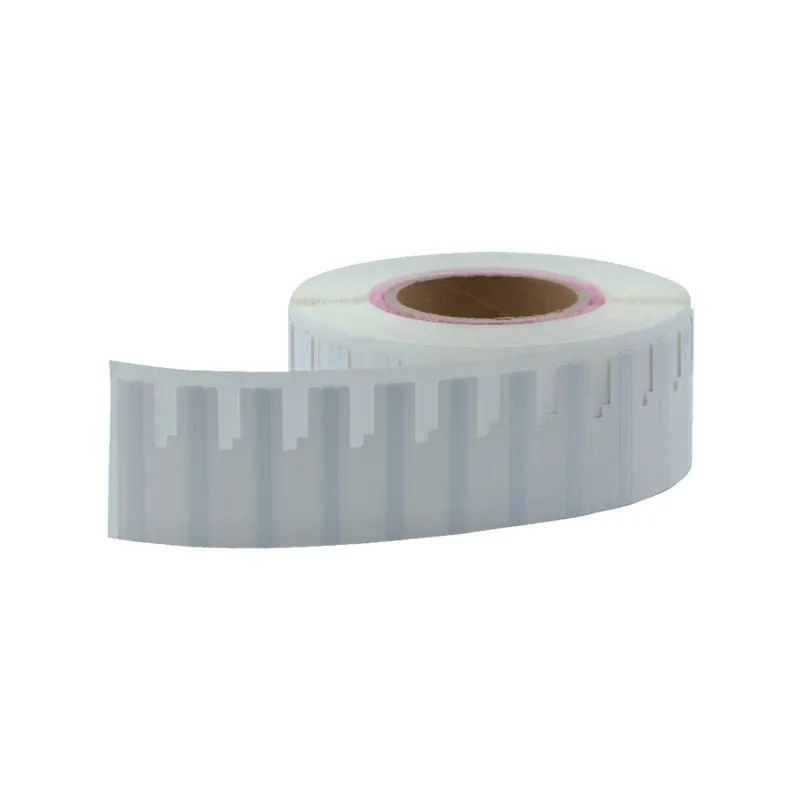
Flexible UHF On-Metal RFID Label ID-64X06 (64 × 6 mm)
A 6 mm-high flexible UHF on-metal RFID strip for metal items too narrow for a standard tag: tool shanks, slim brackets, tray edges and DIN rails. The face still takes a serial number or small barcode.
₹65
per piece + 18% GST
Minimum order: 500 pieces · the final price for your quantity is confirmed in the quote
View datasheet PDF · 172 KB- 7-day replacement · 1-year warranty against manufacturing defects
- Blue Dart next-day delivery
- Samples ₹250 (1–2 pcs, incl. shipping) · request
Key features
- Only 6 mm high: fits edges and shanks where wider labels overhang
- 64 mm length leaves room for a printed serial number or small barcode
- Reads on metal at up to 6 m, depending on reader antenna and placement
- Flexible strip follows shallow curves on rods and profiles
- EPC Gen2 / ISO 18000-6C, 860–960 MHz, covers India’s 865–868 MHz band
- Frequency
- 860–960 MHz (covers India’s 865–868 MHz band)
- Protocol
- EPC Gen2 / ISO 18000-6C
- Read range
- Up to 6 m on metal (depends on reader antenna and surroundings)
Overview
A narrow on-metal RFID label for slim metal parts
Some metal assets simply have no room for a normal label. The ID-64X06 is a UHF on-metal RFID strip just 6 mm high and 64 mm long, so it fits along a tool shank, a bracket, a panel bezel or the rim of a metal tray without overhanging. It is thin and flexible, follows shallow curves, and the face still takes a printed serial number or a small barcode.
Typical uses
- Spanners, drivers and extension bars in a tool crib
- Instrument tray edges and slim brackets in equipment stores
- DIN rails, bezels and slim enclosures inside control cabinets
- Patch-panel strips and connectors in data centres
Getting reliable reads from a 6 mm strip
With so little height, how you present the reader matters more than it does with a wider label. Degrease the surface and apply the strip dead straight along its length, because a twist costs read distance. Scan from in front of the printed face rather than along the edge. If a piece will not read, check alignment and placement first; our RFID troubleshooting guide covers the usual causes.
Need more print area? See the wider formats in on-metal RFID tags.
Typical applications
- Tool crib issue and return
- Instrument tray edges
- Control cabinet components
- Data centre patch panels
- Slim brackets and frames
- Rods and bar stock
Specifications
Datasheet (PDF)| Dimensions | 64 × 6 mm |
|---|---|
| Frequency | 860–960 MHz (covers India’s 865–868 MHz band) |
| Protocol | EPC Gen2 / ISO 18000-6C |
| Read range | Up to 6 m on metal (depends on reader antenna and surroundings) |
| Mounting | Applied directly to metal; narrow flat or gently curved faces |
| Material | Thin flexible substrate with printable face; RoHS-compliant |
| Compatible with | Standard UHF RFID readers and RFID label printers |
Frequently asked questions
What can a 64 × 6 mm on-metal label be stuck on?
Does the narrow size reduce read range?
Can an RFID printer print and encode such a narrow label?
Which reader should I use for a tool crib?
Related products
All On Metal RFID Tags →
ID-UM6025
Printable UHF On-Metal RFID Label ID-UM6025 (60 × 25 mm, Monza R6)
₹65 + GST
Min. order 500 pcs
ID-UM6406
Printable UHF On-Metal RFID Label ID-UM6406 (64 × 6 mm, UCODE 8/9)
₹65 + GST
Min. order 500 pcs

ID-UM6006
Printable UHF On-Metal RFID Label ID-UM6006 (60 × 6 mm, UCODE 8)
₹65 + GST
Min. order 500 pcs
ID-UM9522
Printable UHF On-Metal RFID Label ID-UM9522 (95 × 22 mm, Monza R6)
₹65 + GST
Min. order 500 pcs
ID-UM8040
Printable UHF On-Metal RFID Label ID-UM8040 (80 × 40 mm, Monza R6)
₹65 + GST
Min. order 500 pcs